Usability Updates: Checklist Editor Fix, Account Name Editing, and Custom Radios in v6.42.0
GA Kneeboard version 6.42.0 brings several usability fixes and layout improvements across checklist editing, account settings, and radio tiles.
1. Checklist Page Editing Restored
An event-binding issue in the checklist page header previously prevented the settings modal from opening when clicking the settings icon or page title.
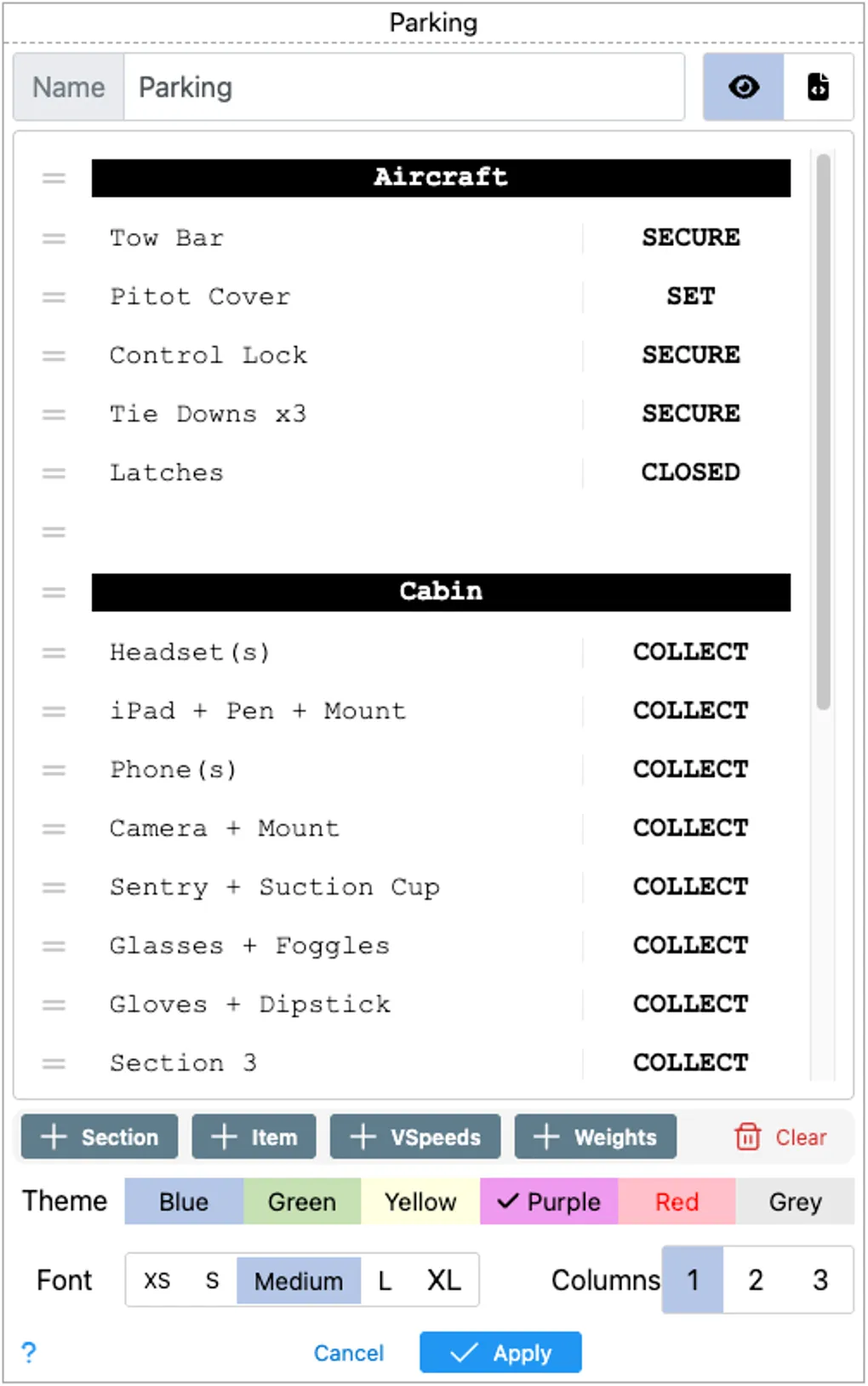
- Direct Header Access: Header click and settings event listeners are now restored. Clicking the checklist title or settings gear immediately opens the Checklist Editor dialog.
- Layout & Section Controls: Pilots can once again adjust item ordering, add sections (such as Preflight, Run-up, Cruise, and Parking), switch column layouts (1 to 3 columns), and toggle font sizing directly from the page view.
- Color Themes: Full access to checklist color themes (Blue, Green, Yellow, Purple, Red, Grey) ensures quick visual differentiation between normal and emergency procedures.
2. Account Name Editing in Account Details
Pilots can now update their account display name directly from the Account Details screen.
- Inline Updates: The name field now features a dedicated update action, saving changes directly to your account profile without requiring support requests.
- Immediate Session Sync: Updated display names reflect immediately in the top navigation and session headers across your workspace.
3. Improved Radio Tile Layout and “Custom Radios” Labeling
The Radio tile received layout refinements to keep frequencies clear and readable under cockpit lighting:
- Clear Mode Labeling: When displaying a user-curated frequency list, the tile header now clearly reads Custom Radios instead of generic “Radios”, distinguishing it from automated Route Radios and Service Volumes.
- Responsive Frequency Grid: Frequency box spacing now formats dynamically into 1, 2, or 3 columns on standard tiles, and up to 6 columns on expanded (span-2) tiles. Box sizing scales appropriately to prevent truncated frequency labels or names.
- Updated Mode Shortcuts: Mode selection shortcuts are updated to C for Custom Radios and S for Service Volumes.
Cockpit Benefit
Checklist adjustments and custom communications frequencies are central to pre-flight preparation. These fixes ensure you can assemble, format, and review your kneeboard pages quickly without friction before heading out to the aircraft.
The update is live now at kneeboard.ga. Feedback and bug reports can be sent to support@aviatesoftware.aero.