Simplified Airport Tile Settings, Dynamic Airport Prompts, and Workflow Refinements
This update streamlines airport configuration with interactive inline search and collapsible settings, integrates quick-access video training directly in the kneeboard selection column, and cleans up application navigation.
1. Airport Configuration & Tile Experience
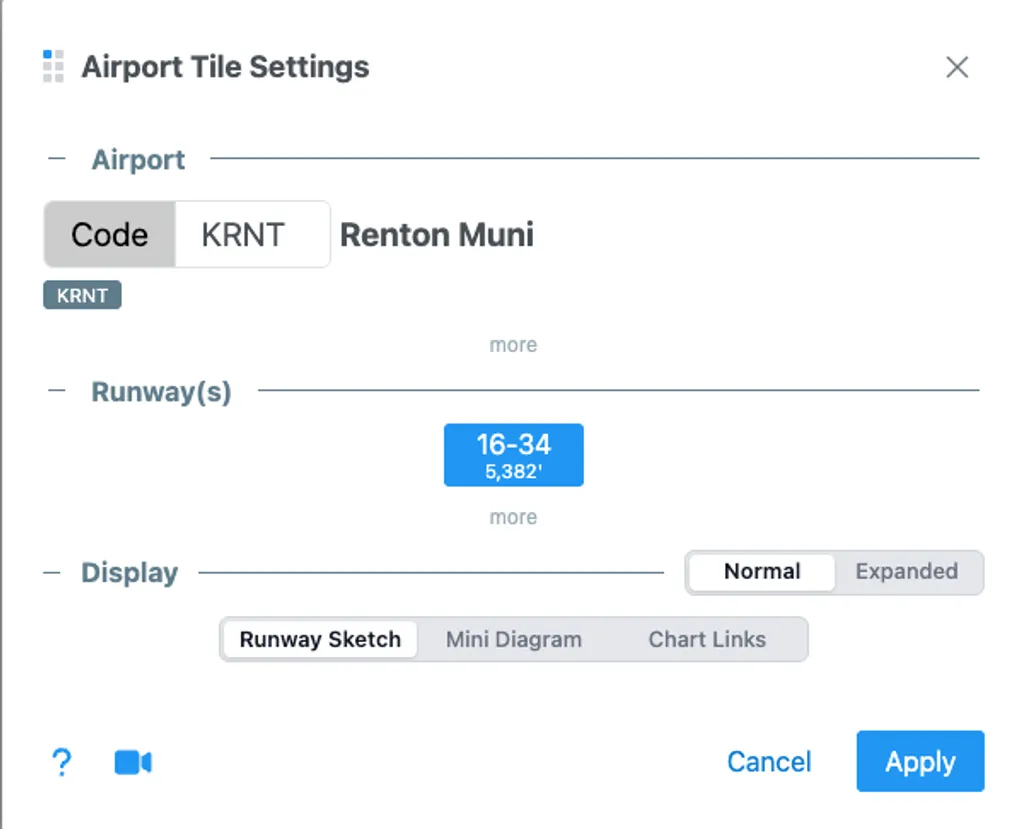
- Dynamic Inline Airport Prompt: Replaced static placeholders with an interactive airport search prompt directly inside the airport tile. Pilots can look up and configure departure, destination, or alternate airports immediately without navigating away from the active page.
- Collapsible Advanced Settings: Reorganized the airport tile settings panel with an expandable “Advanced” section. High-frequency adjustments remain front-and-center, while deeper configuration options stay organized and accessible behind smooth collapsible transitions.
- Persistent Settings State: The expanded or collapsed state of advanced settings is saved across browser sessions, preserving your preferred configuration density.
- Authentication Status Indicator: Added a visual authentication status badge in the airport settings panel to clearly show active account capabilities and cloud sync status.
- Resilient Airport Diagram Handling: Implemented fallback handling and graceful error recovery for FAA airport diagrams, ensuring network issues or missing source diagrams never disrupt the tile layout.
- Cockpit Benefit: Faster pre-flight setup, reduced screen clutter during briefing, and reliable diagram fallbacks when finalizing knee-level flight information.
2. Kneeboard Column & Training Resources
- Integrated Video Tutorial Link: Added a direct video tutorial link within the selection column to help pilots learn how to organize, customize, and print kneeboards efficiently.
- Streamlined Link Styling: Refined tutorial link typography and font sizing to blend cleanly into the sidebar without distracting from kneeboard assembly.
- Cockpit Benefit: Provides quick onboarding and refresher guidance directly in the workspace without interrupting the flight preparation workflow.
3. Application Navigation & UI Polish
- Context-Aware Header: Updated the main navigation header to hide the store link during unauthenticated sessions, reducing extraneous options.
- Direct App Entry: Streamlined initial routing so returning pilots jump straight to the active kneeboard interface instead of repeating the introductory landing flow.
- Interactive Version Overlay: Added a clean version overlay with an auto-dismiss timer to confirm running release details without blocking user actions.
- Asset Restoration: Restored high-resolution background assets across application backdrops and order confirmation screens.
- Cockpit Benefit: Cuts down transition taps and speeds up time-to-kneeboard when updating briefing packs on tight schedules.
