Introducing Dual-Column Kneeboard Layouts, Modular Column Components, and Custom Page Titles (v6.35.0)
Managing cockpit workload requires having the right data structured logically and accessible at a glance. In version 6.35.0 of GA Kneeboard, we have introduced a side-by-side Columns Page Layout, five dedicated modular column components, custom page titles, and improvements to ATIS rendering.
Here is an overview of the new capabilities and how they support in-flight workflow management.
1. Dual-Column Page Layout
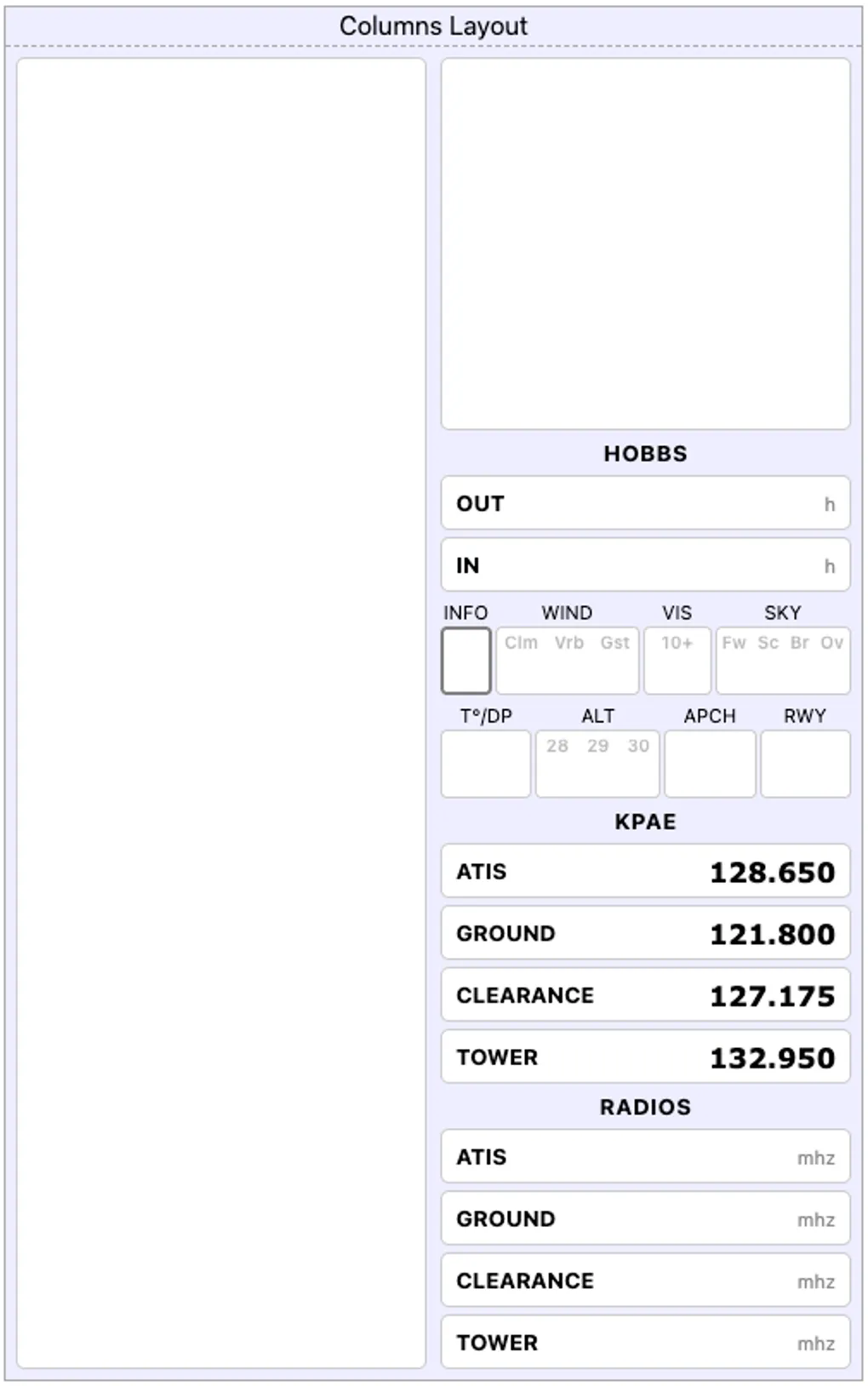
The new Columns page layout introduces a side-by-side two-column grid. This format allows you to separate and organize information logically across the page—such as placing departure details on the left and arrival data on the right, or grouping frequencies on one side with an active scratchpad on the other.
- Independent Column Configuration: Select either column in edit mode to add, configure, and manage its components independently.
- Item Reordering: Easily rearrange elements within each column or remove items with a single tap.
- Cockpit Benefit: Maximizes vertical screen and print space while keeping distinct phases of flight cleanly segmented.
2. Five Modular Column Components
To support the column format, we designed five specialized components tailored for vertical column widths:
- Section Dividers (
Section): Add clear subheadings to organize your kneeboard by flight phase (e.g., Departure, En Route, Arrival, Clearance). - Airport Frequencies (
Radios): Select an airport identifier to generate a compact frequency block containing ATIS/AWOS, Ground, Clearance Delivery, and Tower. If an airport has multiple tower frequencies, tap to cycle through them. - Compact ATIS Block (
ATIS): A dedicated two-tier weather scratchpad optimized for column layouts:- Top Row: Information code, Wind (with watermarks for
Clm,Vrb,Gst), Visibility (10+), and Sky Condition (Fw,Sc,Br,Ov). - Bottom Row: Temperature / Dew Point, Altimeter setting (
28,29,30), Approach in use, and Landing Runway.
- Top Row: Information code, Wind (with watermarks for
- Custom Fields (
Custom): Add single-line data entries with customizable labels and units (e.g.,SQUAWK,CRUISE ALT: ft,FUEL BURN: gph,V-REF: kts). - Auto-Expanding Scratchpad (
Notes): A dynamic note area that automatically expands to fill available column height, ideal for copying CRAFT clearances, taxi instructions, or PIREPs.
3. Custom Page Titles
You can now customize page names across both Columns and Strips layouts:
- Tap the page header to open the Rename Page dialog.
- Assign descriptive titles tailored to your flight plan (such as “KSQL Departure”, “KMRY Arrival”, “Emergency Checklist”, or “Weather Brief”).
- Cockpit Benefit: Eliminates generic layout names, making multi-page kneeboards faster to navigate in flight.
4. ATIS Engine Refactor & UI Improvements
- Standardized Weather Engine: Unified ATIS data formatting across both horizontal Strips and vertical Columns layouts, ensuring consistent typography, layout density, and print legibility.
- Streamlined Header Actions: Updated settings shortcuts and edit controls for quicker template adjustments before flight.
How to Use
- Open the Kneeboard editor.
- Add a new page (or replace an existing page) and select Columns.
- Tap the Settings gear icon in the header to enter edit mode.
- Select Column 1 or Column 2 to add and arrange your Radios, ATIS, Custom Fields, Section Dividers, and Notes blocks.
