
Straight-In Update: IFR Low Charts, Streamlined Settings, and Layout Refinements
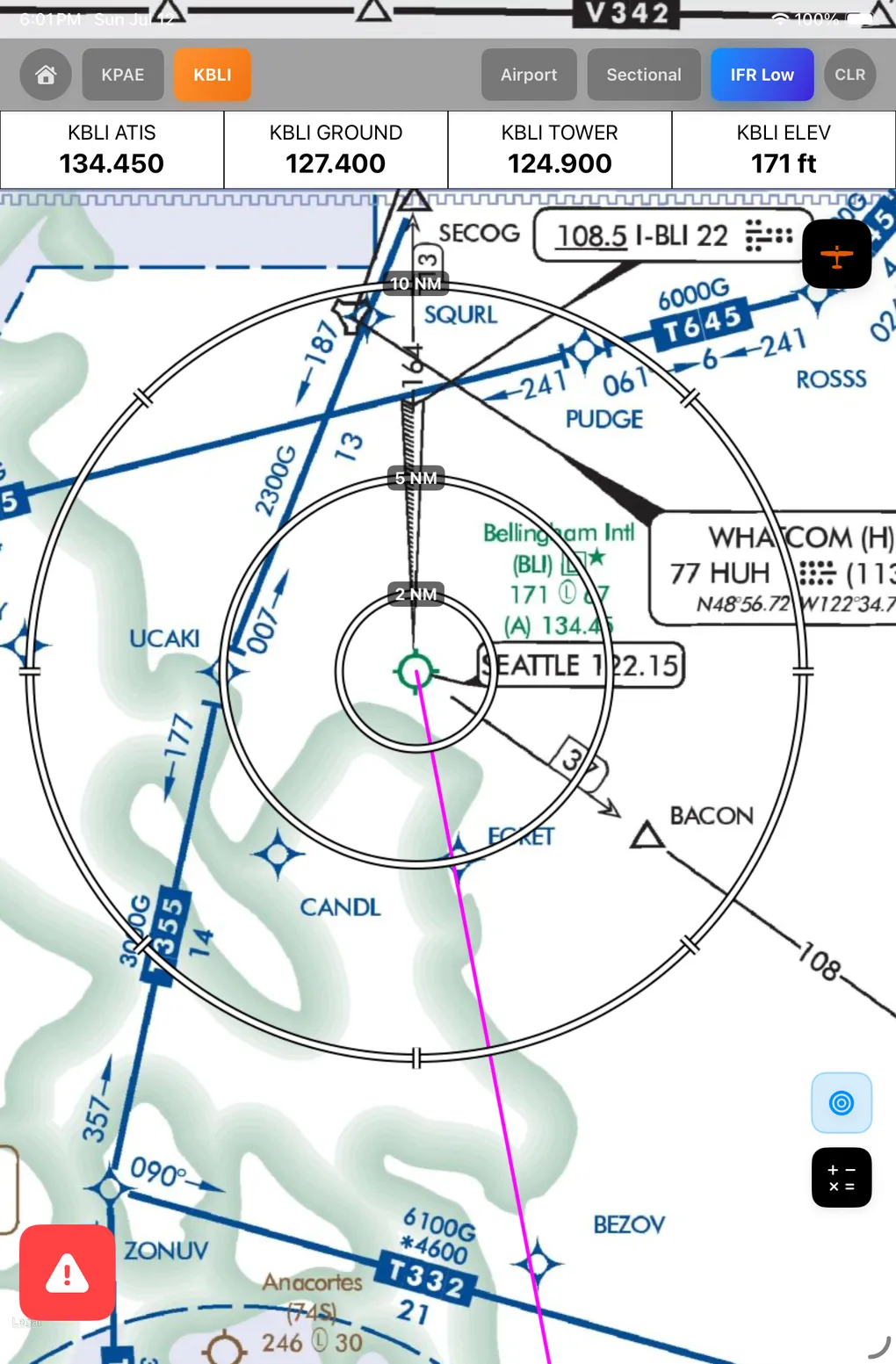
This update introduces IFR Low chart support, simplified session management, centralized optional tool configuration, and visual refinements designed to improve cockpit usability.
IFR Low Altitude Chart Support
- Parallel Downloads: The map downloader now fetches VFR Sectional and IFR Low Altitude charts simultaneously in the background.
- Flight Bag Monitoring: Active and pending IFR Low charts are integrated into the download cards and flight bag summary.
- Map Rendering: When IFR Low charts are available for the active flight, an “IFR Low” toggle button appears in the page header to switch chart overlays.
- Error Telemetry: Automatic error reporting logs misconfigured chart layers.
- Cockpit Benefit: Pilots can monitor download progress and transition between sectional maps and IFR Low charts during en-route phases.
Settings and Authentication Improvements
- Simplified Sessions: Session validation has been decoupled from external services. A custom, long-lived token system reduces frequent logouts.
- In-App Soft Re-authentication: If a session issue occurs, a simple in-app password confirmation prompt resolves it without logging the pilot out.
- Checklist Visibility Settings: A new Checklist Settings menu lets pilots independently toggle the visibility of Normal and Emergency procedures. Checklist count badges dynamically reflect active counts.
- Optional Flight Tools Toggles: Pilots can toggle the visibility of the Proximity Circle and PDF Rotation tools in settings, configuring exactly which tool buttons display in the primary overlay.
- Cockpit Benefit: Keeps session state active during flight and allows pilots to hide unused tools and checklist categories to reduce interface clutter.
Centralized Optional Tools Panel
- Centralized Controls: The Proximity Circles toggle and PDF Rotation button have been moved from approach views into the centralized Optional Tools overlay panel.
- Context-Driven Button Visibility: The Optional Tools panel conditionally shows or hides controls based on the pilot’s settings. The proximity circle toggle automatically checks if the active airport tab is set to instrument approaches (IAP) or if the map is in sectional or IFR Low mode.
- Modernized Icons and Animations: The calculator tool icon has been updated to a cleaner symbol, and buttons now feature spring-based scale animations.
- IFR Low Mode Proximity Circles: Proximity circle overlay tools are now supported on the map when viewing IFR Low charts.
- Cockpit Benefit: Reduces clutter on individual airport and approach screens by consolidating tools into a single, uniform overlay panel accessible across map views.
Checklist Enhancements
- Completion Indicators: A green checkmark appears in checklist headers once all items are completed.
- Next Checklist Guidance: The completion screen displays the name of the next checklist in sequence with an arrow icon.
- Color Coding: Category-specific coloring (blue for normal, red/white for emergencies) helps distinguish checklist states.
- Cockpit Benefit: Provides quick, high-visibility feedback on checklist completion and prompts the pilot for the next logical procedure.
UI & Layout Refinements
- Clear Mode (CLR): A new “CLR” button toggles a minimalist view, hiding side menus, headers, and checklist overlays to maximize the visible map area.
- Absolute Overlays: Runway selection, sectional chart, and approach chart dropdowns are now absolute-positioned overlays that slide out to the left over the map content without shifting the layout.
- Unified Control Dock: Map controls are grouped into a single vertical dock container with a dark background, border, and drop shadow.
- Runway Grouping: Approach charts in the selection dropdown are grouped by runway number with high-contrast headers.
- High-Contrast Map Overlays: Sectional map overlays use a high-contrast double-stroke (thick black outline, thin white inline) for visibility. Proximity circle labels are replaced with tag-style annotations that scale-invariantly preserve text readability.
- Spring-Based Header Transitions: Page header elements are reordered. Tapping the page selection button toggles the airport info strip, wrapped in a clipped container with a spring-based transition.
- Cockpit Benefit: Maximizes map screen area, improves text legibility on overlays, and eliminates shifting menus that could disrupt interaction while flying.
