Feature Update: Tower Frequency Cycling
We have introduced an update to improve radio frequency management at complex airports with multiple tower frequencies.
Frequency Cycling
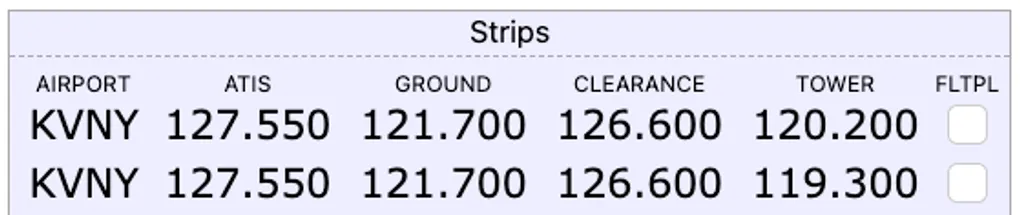
At larger airports with multiple tower frequencies based on direction of flight or runway assignment, the UI previously displayed a single tower frequency. You can now cycle through all available tower frequencies for a given airport.
- Radio Strip: When in edit mode, clicking the frequency display for an airport with multiple tower frequencies will toggle through the available options sequentially.
- IFR Departure Tile: Tapping the
TWRfrequency box rotates the displayed frequency, allowing you to select the correct frequency for your departure runway.
State Persistence
The system preserves your frequency selection. The selected tower frequency is saved in the configuration payload and will automatically reload when returning to the Radio Strip or IFR Tile Departure mode.
Non-Towered Fallbacks
For non-towered fields without active tower frequencies, the system falls back to displaying the CTAF frequency.
Ground Frequency Display Fix
We resolved an issue where the ground frequency in the Radio Tile would occasionally fail to display, showing a placeholder (-) instead of the correct value. The lookup logic has been improved to ensure ground frequencies are reliably populated.
