Fuel Worksheet: Editing, Landing Fuel, and Layout Refinements
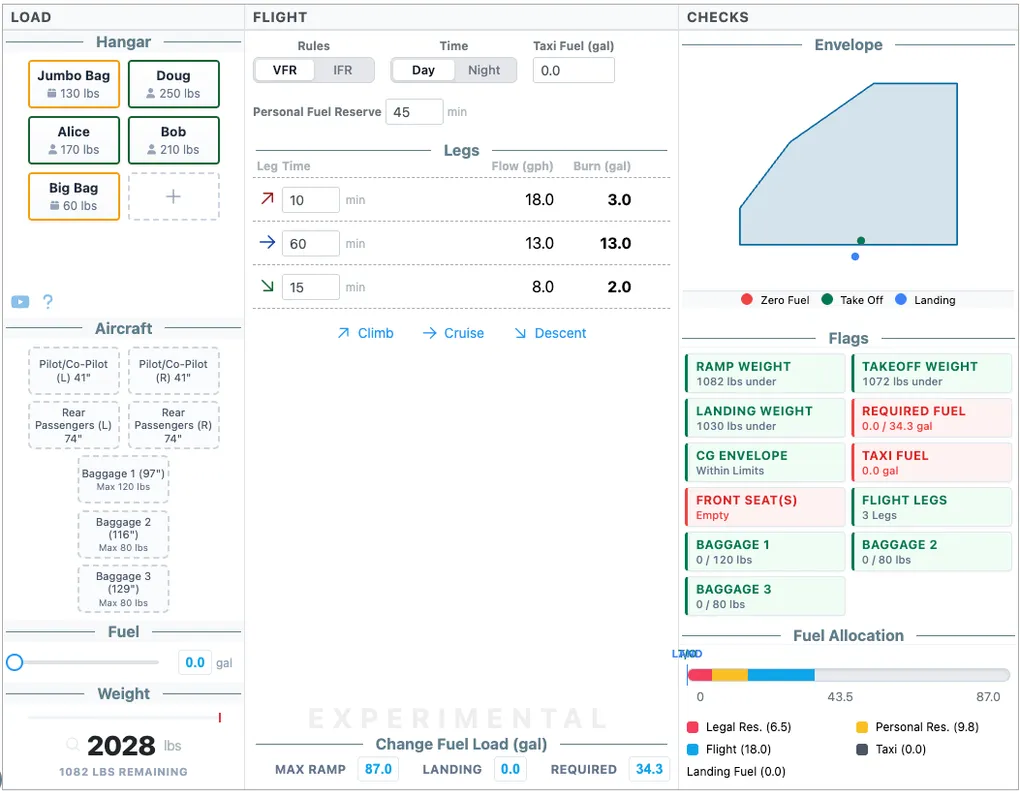
We’ve introduced several updates to the Fuel Worksheet to improve flexibility, speed, and visual clarity during pre-flight planning.
Hangar Item Editing
You can now edit items directly within the “Load Hangar” section. An edit icon has been added to each item, allowing you to tweak values or types on the fly. This eliminates the need to delete and re-add items when making minor adjustments to your loading configuration.
Landing Fuel Automation
A new “Set” button is now integrated into the landing fuel section. This button allows you to quickly populate or calculate landing fuel requirements, reducing manual data entry and ensuring the landing fuel check is prominent and easy to perform.
Visual Thumbnails
The worksheet now features high-quality visual thumbnails. These provide a clear preview of the worksheet’s structure and contents before you dive in, enhancing feature discoverability and providing a more professional interface.
Layout & Sizing Refinements
We have refined the layout constraints to prevent vertical overflow. By enforcing strict sizing and flex-container constraints, the worksheet now fits perfectly on a single 800px page. This is critical for pilots who print their worksheets or use them on tablets with fixed viewing areas, as it ensures all information is visible without scrolling.
