VFR Departure Mode
VFR Departure Mode
Clearance, taxi, and takeoff are data-intensive phases of flight. Between copying ATIS, receiving taxi instructions, and keeping frequencies ready, kneeboards can get crowded.
The VFR Departure Mode for the VFR Tile helps organize this information.
Cockpit-Focused Layout
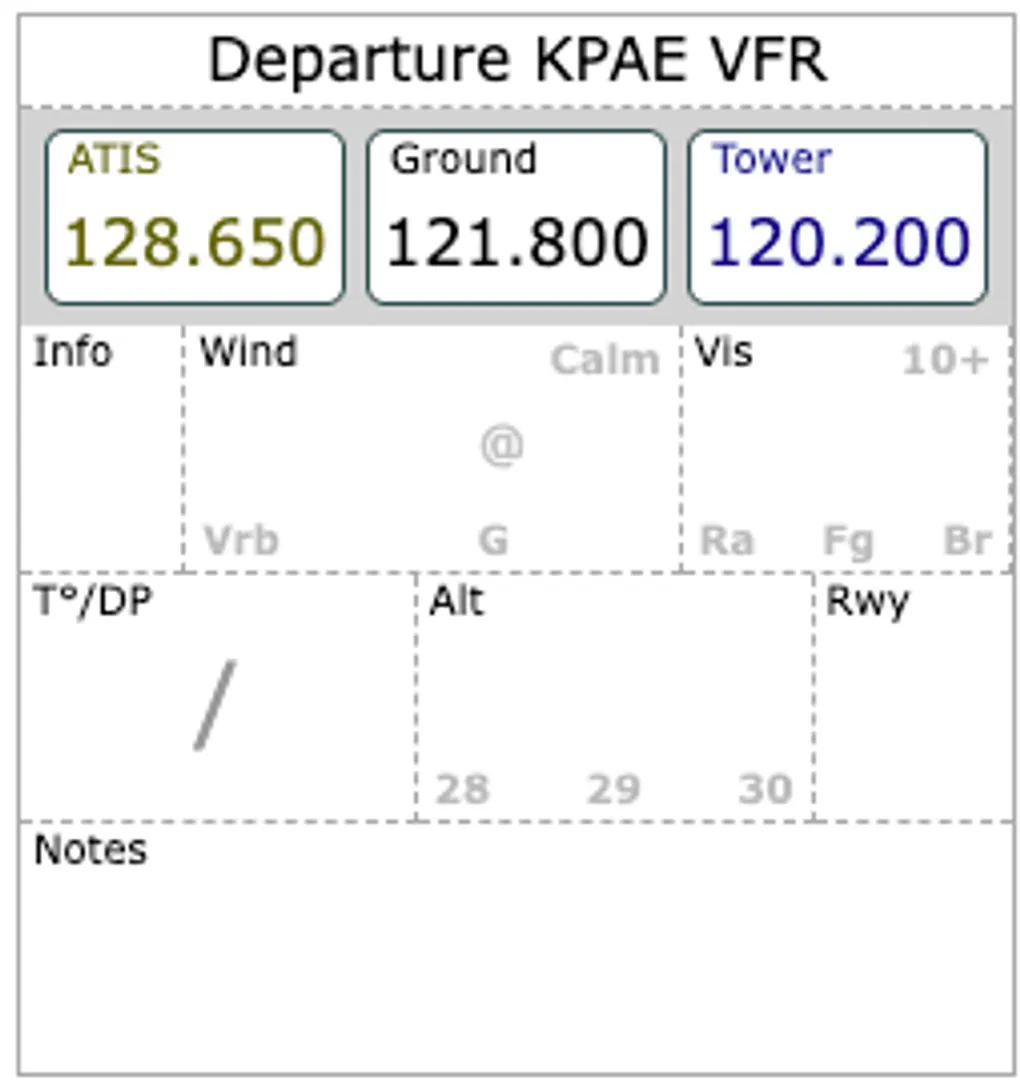
The Departure mode provides a structured workspace to organize pre-flight data efficiently.
1. Dedicated Frequency Bar
The top of the tile features a frequency bar that automatically pulls Weather, Ground, and Tower/CTAF frequencies for your departure airport.
2. Weather Watermarks
Pilots often use their kneeboard for weather notes. The Departure mode includes “Weather Watermarks” for Wind, Visibility, Altimeter, and Temperature. These background hints provide data at a glance without occupying note-taking space.
3. Expanded Notes Area
The lower half of the tile is a dedicated Notes area. A structured grid with dashed lines is ready for taxi instructions or CRAFT clearances.
Smart Integration
VFR Departure mode is designed for low-friction use:
- Auto-Loading: Automatically switches to your departure airport if a route is active.
- Home Base Fallback: Defaults to your configured home airport if no route is set.
- Customizable: The departure airport can be manually updated in the VFR Tile settings.
Getting Started
To use the new mode:
- Open any VFR Tile.
- Tap the Mode Selection Dots at the bottom.
- Select VFR Departure.
This feature was built to streamline pre-takeoff workflows. Let us know how it works for you.
Safe flying!