New Feature: Dynamic Route Frequencies for Your Radio Tile
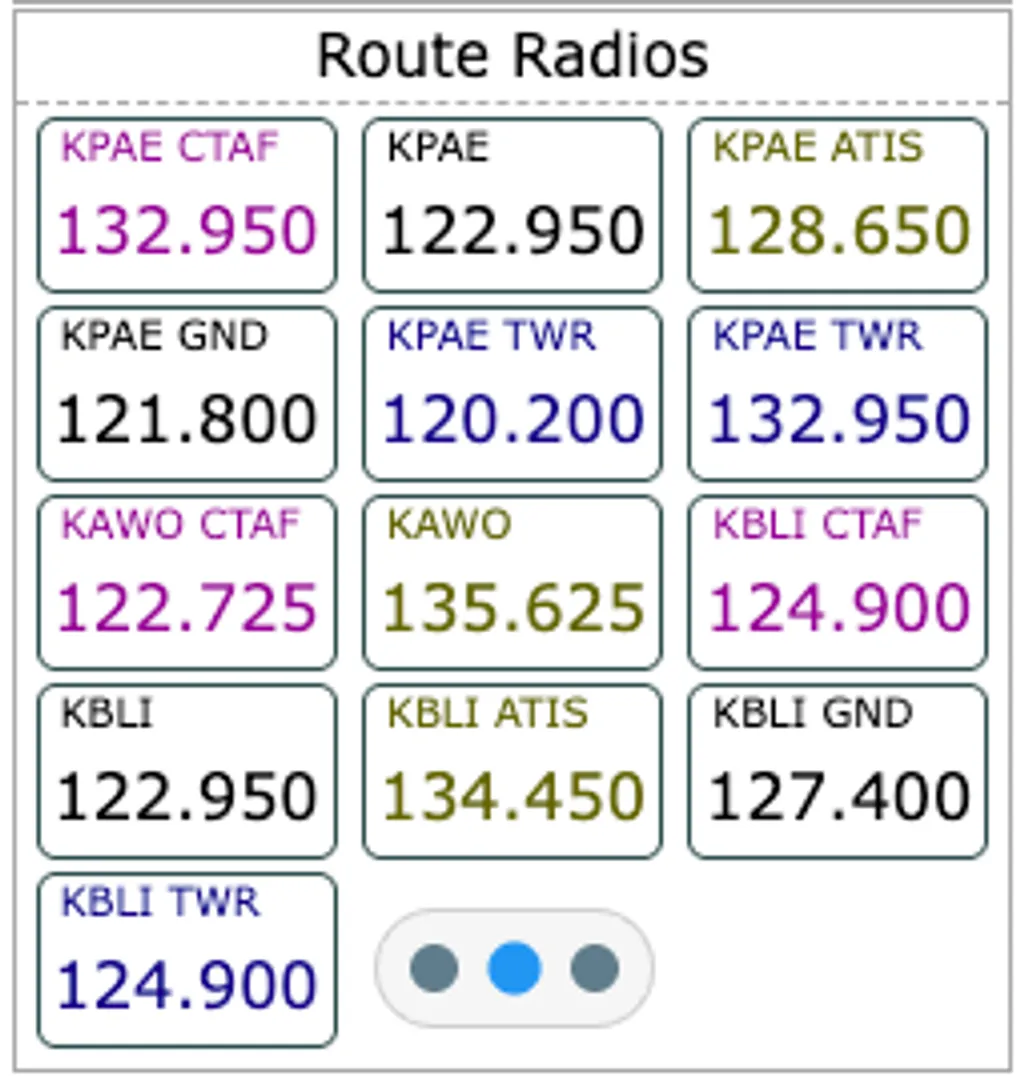
We’re excited to announce a significant upgrade to the Radio Tile in GA Kneeboard: Dynamic Route Frequencies.
What’s New?
Previously, the Radio Tile required manual entry for every frequency you wanted to track. While useful for custom lists, it added extra steps during flight planning. With the new Route Frequencies mode, your kneeboard does the heavy lifting for you.
How It Works
When you select the “Route Frequencies” display mode (accessible via the mode dots at the bottom of the tile), the app automatically scans your active flight plan. It instantly pulls essential frequencies—including ATIS/Weather, Tower, Ground, and CTAF—for your departure, destination, and alternate airports.
Key Benefits
- Automated Planning: No more manual typing for standard airport frequencies.
- Context Aware: Change your destination in the Route settings, and your Radio Tile updates automatically.
- Best of Both Worlds: Your custom manual lists are preserved! You can flip back to “Selected Frequencies” at any time to see your hand-picked entries.
- Persistent Selection: GA Kneeboard remembers which mode you prefer for each tile, so it’s ready exactly how you left it.
How to Use It
- Ensure you have a route configured (Departure and Destination).
- Hover over your Radio Tile and click the second dot at the bottom.
- Watch as your frequencies populate dynamically!
Fly safer and smarter with less head-down time. Happy flying!
